What is JSM (Jira Service Management) and is worth to use it in 2026?

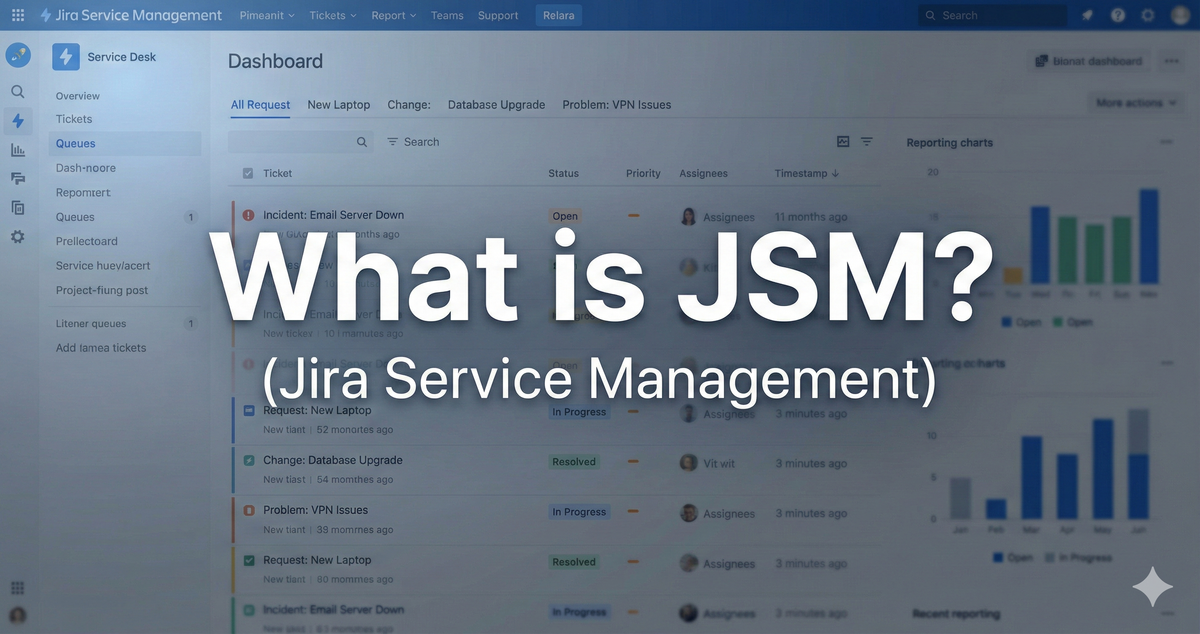
Note: This article is based on my original JSM crash course video, with updated insights for 2026. A brand new, comprehensive video version is coming soon, you can find the quick tutorial in this article now! This free guide covers the fundamentals of JSM, and I'll be following up with an in-depth series covering Assets, customer onboarding, and advanced configurations.
JSM is Absolutely Booming Right Now
Let me start with my honest consultant perspective after 14+ years working with enterprise clients like BBC, Vodafone, NHS, and Lloyds Bank: Jira Service Management is absolutely exploding right now.
Yes, I hear the complaints about pricing. Yes, it's gotten more expensive. But here's the reality—compared to competitors in the enterprise service desk space, Atlassian is still one of the most affordable premium solutions on the market.
If you're feeling sticker shock, I get it. But what you're getting is an incredibly powerful, feature-rich platform that punches way above its price point. This isn't just good software—it's a genuinely premium product that can handle everything from small team helpdesks to massive enterprise ITSM implementations.
What Actually Is Jira Service Management?
At its core, JSM is a service desk that supports both internal and external users. That second part is crucial—this isn't just an IT helpdesk for your employees. You can use JSM to support customers, partners, vendors, anyone who needs service from your organization.
In Atlassian jargon, we often say JSM is "Jira on steroids." It's built on the same foundation as Jira Software, but with powerful additions specifically designed for service management.
The Portal: JSM's Secret Weapon
The most unique feature JSM brings to the Jira ecosystem is the portal. This is your customer-facing interface, and it's a game-changer.
Here's what makes portals special: they don't require licenses. Your customers, employees, or whoever you're supporting can submit requests, check status, and interact with your service desk completely free. No per-user charges.
Now, there's a small caveat. If you're integrating with Atlassian Guard for advanced security and authentication, those portal users will need Guard licenses. But for standard portal access? Free. (I've got a detailed article on Guard integration if you want to dive deeper into that—I'll link to it.)
We sometimes call the portal the "front-end" because that's exactly what it is. It's the public face of your service desk. Your users never have to see the complex workflows and configurations happening behind the scenes.
The portal is highly configurable. You can add knowledge base articles from Confluence, customize request forms, and now there's even AI integration with Atlassian's Rovo. The AI assistant can help users find answers before they even submit a ticket. I'm actually planning a dedicated video on the Rovo AI features because they're becoming incredibly powerful.
See my Knowledge Base Setup Guide for how to connect them properly.
Can you configure everything exactly how you want? No, there are limitations. But for 95% of use cases, the portal gives you exactly what you need to create a professional, user-friendly service experience.
The Back-End: Where the Real Work Happens
Behind that polished portal is what we call the "meat and potatoes"—the actual service desk interface where your agents work. This is full Jira, with queues, workflows, SLAs, automation, and all the powerful features that make JSM so capable.
Your agents work in this back-end environment, triaging requests, collaborating with teams, managing escalations, and driving tickets to resolution. It's where the real service delivery happens.
Let's Talk About Pricing (The Elephant in the Room)
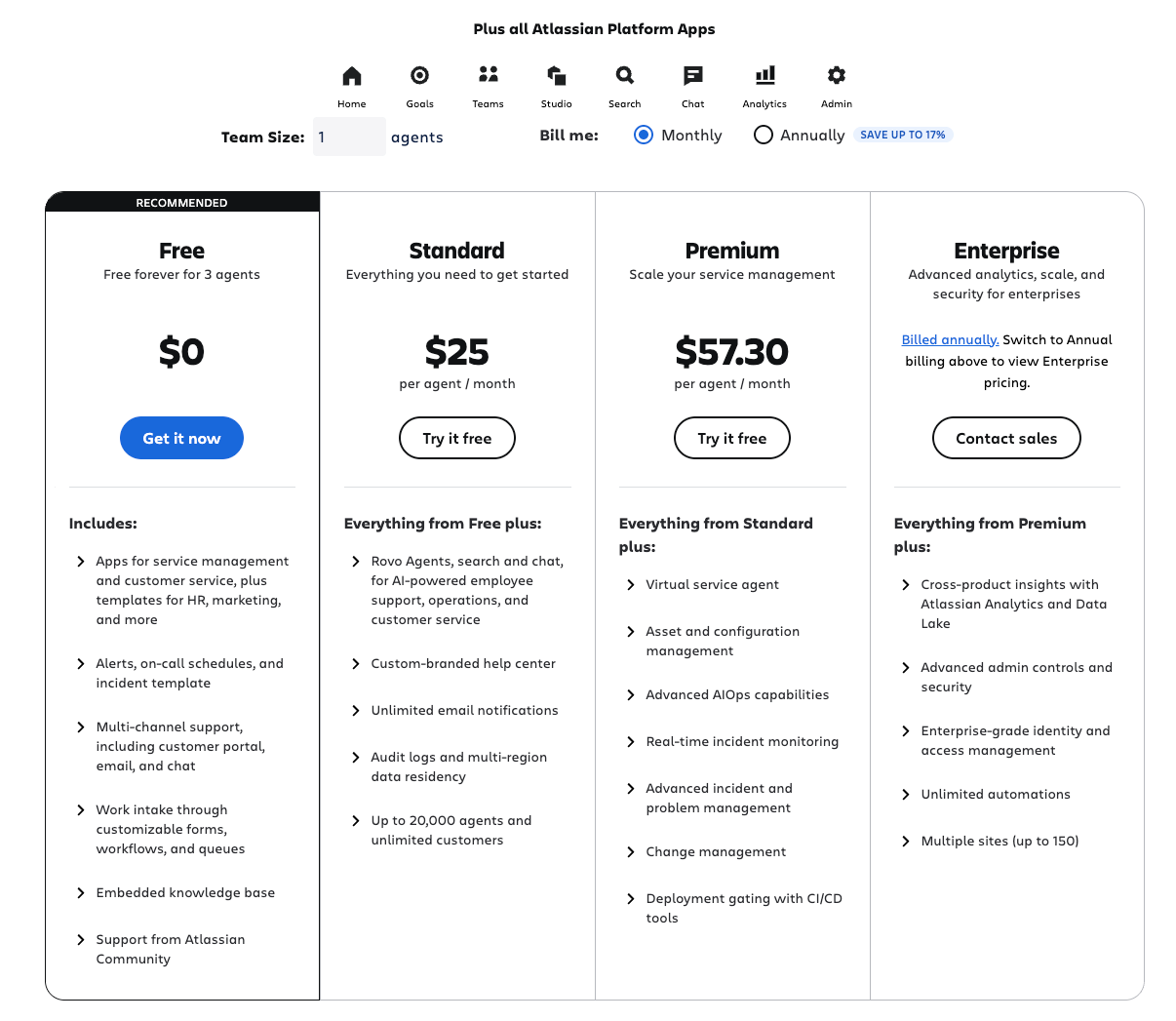
I can't talk about JSM in 2026 without addressing pricing. There's been a significant shift recently, and I'm seeing more and more clients moving to JSM Premium. Yes, it's pricier. But there's a reason.
Here's the current pricing structure:
- Free tier: Up to 3 agents (great for testing or tiny teams)
- Standard: $25 per agent/month (1-10 agents)
- Premium: $57.30 per agent/month (1-10 agents)
Premium is nearly double the Standard price. That's a big jump. But here's what you get with Premium that changes everything:
- Virtual Agents: AI-powered automation that can handle common requests
- Assets: Full IT asset management (CMDB functionality)
- Operations: Advanced incident management with on-call scheduling
- Full ITSM/ITIL implementation capabilities
My Honest Recommendation: Premium Is Worth It
From my consultant perspective, working with everyone from small businesses to massive enterprises, I have to tell you—I recommend Premium in most cases.
Do I wish it was cheaper? Absolutely. Can I do anything about Atlassian's pricing? Unfortunately not. But if you need proper asset management, if you want virtual agents handling tier-1 requests, if you're implementing ITSM best practices—Premium pays for itself quickly.
Assets alone justifies the upgrade for most IT teams. I'm releasing a comprehensive Assets guide very soon because it's that important. Being able to track your IT infrastructure, link assets to requests, manage relationships between configuration items—this is fundamental ITSM stuff that Standard simply can't do.
Check out my JSM Assets Management guide for the complete walkthrough.
Atlassian Is Betting Big on JSM
Here's my personal observation, though it's not exactly a secret: Atlassian is investing heavily in JSM right now. It appears to be their top priority product.
While Jira and Confluence are getting updates (and Confluence is receiving significant attention with its AI features), JSM is getting the lion's share of new capabilities, AI integration, and platform improvements.
This tells me two things:
- JSM is driving serious revenue for Atlassian
- The service management market is where they see the biggest growth opportunity
For you as a potential user, this is actually great news. It means continuous improvement, frequent feature releases, and a product that's only getting better.
Why JSM Stands Out From Competitors
Let me break down what makes JSM special compared to other service desk platforms:
Super Flexible Licensing: Those free portal users are huge. Most competitors charge per user across the board. With JSM, your 10-person IT team can support 10,000 employees or customers without additional license costs.
Intuitive Request Forms: Creating service request forms is genuinely easy. You can build complex, multi-step forms with conditional logic, dynamic fields, and professional layouts without coding.
See my JSM Forms guide for step-by-step form building - I use forms on 95% of my implementations.
Powerful SLAs: Service Level Agreements are built in and highly configurable. You can set different SLA targets based on priority, customer type, request category—whatever your business needs.
I cover SLA setup in detail in my JSM SLA Configuration Guide - it's simpler than most people think.
Automation That Actually Works: JSM's automation engine is incredibly powerful. You can automate ticket routing, escalations, notifications, field updates—pretty much anything you can imagine. And here's the exciting part: Atlassian's Rovo AI can now help you build automations. Is it perfect? Not yet. But it's improving every month, and it's already capable of handling semi-complex automation scenarios without you writing a single line of code.
Seamless Atlassian Integration: If you're already using Jira Software or Confluence, JSM integrates natively. Your development teams can link service requests to bugs and features. Your knowledge base lives right in Confluence and surfaces automatically in the portal.
Who Should Use JSM?
Based on my 14+ years of implementation experience, JSM works brilliantly for:
- IT Service Desks: This is the classic use case, and JSM excels at it
- HR Teams: Employee onboarding, equipment requests, policy questions
- Facilities Management: Office requests, maintenance tickets, space management
- Customer Support: External customer service and support operations
- Legal Teams: Contract requests, compliance questions, legal intake
- Finance: Expense approvals, budget requests, vendor management
Really, any team that provides services to internal or external customers can benefit from JSM.
The Bottom Line
Jira Service Management in 2026 is a mature, powerful, feature-rich platform that's only getting better. The pricing has increased, particularly for Premium, but you're getting enterprise-grade capabilities at a fraction of what traditional ITSM solutions cost.
If you're evaluating service desk solutions, JSM should absolutely be on your shortlist. The combination of free portal users, powerful automation, comprehensive ITSM features, and continuous innovation makes it a compelling choice for organizations of any size.
Is it perfect? No. But show me a perfect software platform. What JSM offers is a solid foundation that grows with your organization, backed by a vendor that's clearly committed to making it even better.
Coming Soon: I'm releasing a complete series on JSM implementation, including deep dives on Assets management, customer onboarding workflows, and advanced automation strategies. Subscribe to stay updated, or if you need help with your JSM implementation right now, book a consultation — I'd love to help you get the most out of this powerful platform.
Ready to get started now? Follow my JSM Quick Start Tutorial to set up your first service desk in 15 minutes.