Jira Plans: The "Helicopter View" That Transforms Project Visibility

Introduction: The Visibility Crisis Every Organization Faces
Let me be direct: 98% of my clients struggle with visibility when they first come to me.
After 14 years consulting for organizations like BBC, Vodafone, NHS, and Lloyds Bank, this is the most common pain point I encounter. Teams are drowning in work across multiple projects, but nobody has a clear view of what's actually happening across the organization.
"Mike, we can't see the big picture."
"Mike, our stakeholders keep asking for status updates we can't easily provide."
"Mike, we have 15 projects running and no single place to see them all."
Sound familiar?
Here's the truth: Jira Plans (part of Jira Premium) is THE solution to this visibility problem. It's what I call the "helicopter view"—the ability to rise above the day-to-day chaos and see your entire project landscape from 30,000 feet.
And honestly? It's a shame Atlassian doesn't include Plans in Jira Standard. Because visibility isn't a luxury—it's essential for any organization managing complex work.
In this comprehensive guide, I'll show you:
- Why the "helicopter view" is transformational for organizations
- What Jira Plans actually does (beyond just roadmaps)
- How it solves the visibility crisis in ways filters and dashboards can't
- When Plans justifies upgrading from Standard to Premium
- Real-world examples from my consulting practice
- How to use Programs (the hidden SAFe methodology tool)
Fair warning: Plans is part of Jira Premium, which costs double Jira Standard. But from my consultant perspective, visibility is exactly why most organizations upgrade—and it's worth every penny.
The Visibility Problem: Why Filters and Dashboards Aren't Enough
Before we dive into Plans, let's acknowledge the elephant in the room.
"Can't We Just Use Filters and Dashboards?"
Yes, you can achieve visibility in Jira Standard through:
Option 1: Advanced Filters (JQL)
- Create complex JQL queries across multiple projects
- Save and share filters
- Build board views based on filters
Option 2: Dashboards
- Combine multiple gadgets
- Aggregate data from different projects
- Create custom views for stakeholders
Option 3: Multi-Project Boards
- Merge Scrum or Kanban boards across projects
- Use board filters to show cross-project work
So Why Isn't This Enough?
Here's what I tell every client who asks this question:
Filters are powerful but:
- Require JQL expertise (most stakeholders don't have this)
- Don't show hierarchical relationships visually
- Provide data, not insight
- Need constant maintenance as projects evolve
Dashboards are useful but:
- Static snapshots, not interactive planning tools
- Can't handle "what-if" scenarios
- Don't support drag-and-drop planning
- Limited hierarchy visualization
Multi-project boards work but:
- Only show issues at one hierarchy level
- No initiative or portfolio view
- Can't visualize dependencies across projects
- Timeline view is limited to single project
Bottom Line: These tools give you data. Plans gives you visibility.
There's a massive difference.
The "Helicopter View": What Makes Plans Different
What Is the Helicopter View?
Imagine you're the CEO of a construction company. You have 15 building projects across 5 cities.
With filters/dashboards: You see lists of tasks, issue counts, status percentages. You can drill down into each project individually.
With Plans: You see all 15 projects on a single timeline. You see which projects share resources, which are delayed, where bottlenecks exist, and how one project's delays impact others. You can scenario-plan: "What if we shift this team from Project A to Project B?"
That's the helicopter view.
It's not just seeing the work—it's seeing the relationships between work, the strategic picture, and the impact of decisions before you make them.
Why This Matters for Every Role
For Executives:
- Portfolio visibility across all initiatives
- Resource allocation insights
- Strategic planning capabilities
- Real-time progress against roadmaps
For Program Managers:
- Cross-team dependencies
- Capacity planning
- Risk identification (blockers, resource conflicts)
- Scenario modeling
For Product Managers:
- Roadmap communication
- Feature prioritization visualization
- Initiative tracking
- Stakeholder reporting
For Team Leads:
- Understanding how their work fits the bigger picture
- Visibility into dependencies from other teams
- Realistic capacity planning
- Clear priorities from leadership
What Is Jira Plans?
Jira Plans (formerly Advanced Roadmaps) is Jira Premium's portfolio planning, roadmapping, and visibility tool.
Core Capabilities:
1. Cross-Project Visibility
- View work across unlimited projects simultaneously
- Support for Scrum, Kanban, JSM, and business projects
- Unified timeline across your entire organization
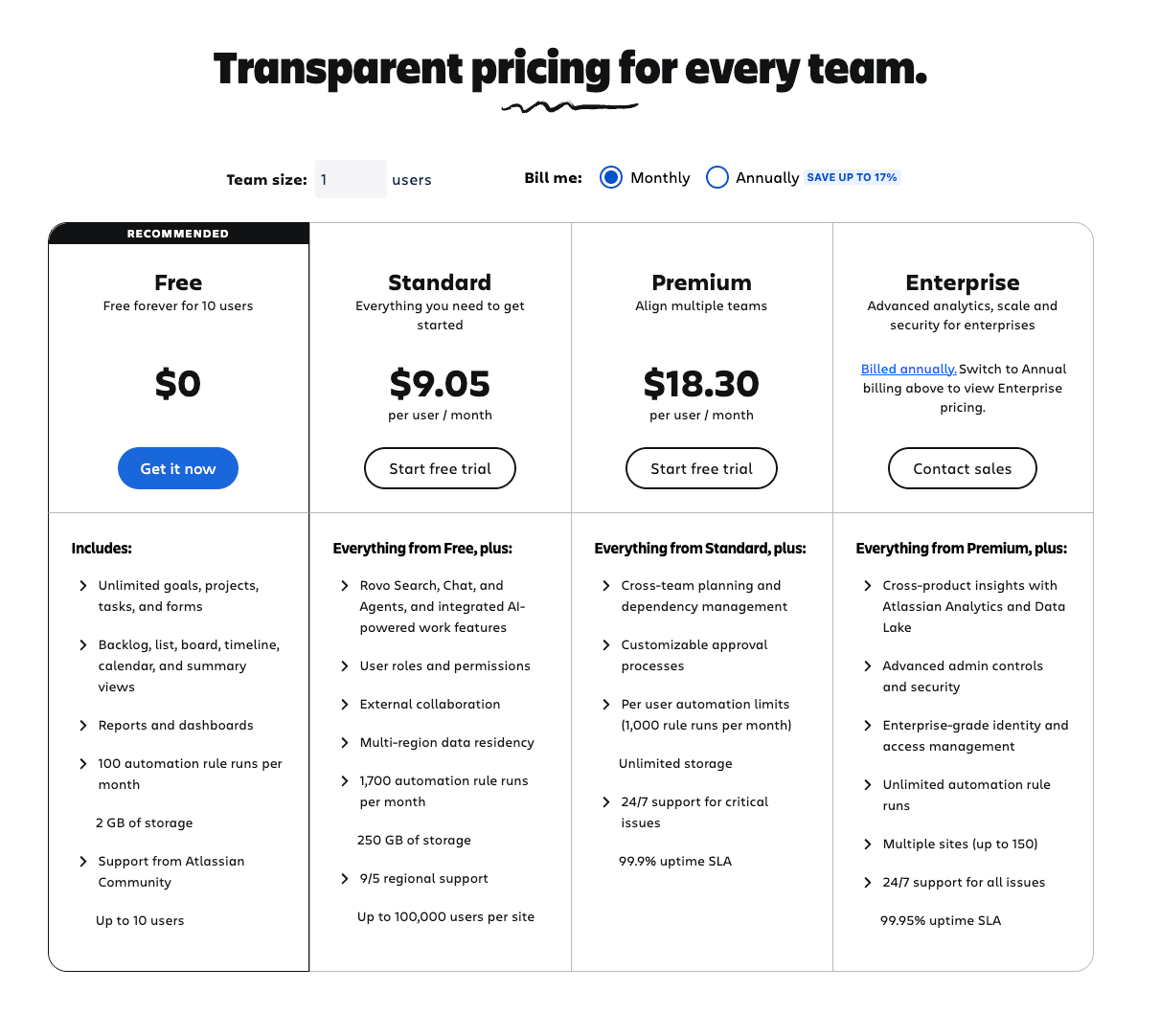
2. Visual Gantt Charts
- Timeline-based view of all work
- Drag-and-drop planning
- Hierarchical visualization
3. Full Hierarchy Support
- Initiatives (top level - your strategic themes)
- Epics (major features or work packages)
- Stories (user-facing functionality)
- Tasks (technical work)
- Subtasks (detailed work items)
- You can even go 5-6 levels deep if needed
4. Scenario Planning ("What-If" Mode)
- Test different roadmap scenarios
- Make changes without affecting Jira
- Compare multiple approaches
- Commit changes only when ready
5. Dependency Mapping
- Visual dependency graphs
- Identify blockers and critical path
- Cross-project dependency tracking
- Add new dependencies from the visualization
6. Advanced Reporting
- Epic-level progress tracking
- Initiative completion metrics
- Team capacity utilization
- Summary views for executives
7. Confluence Integration
- Embed live roadmaps in Confluence pages
- Automatic updates (no manual exports)
- Stakeholder-friendly presentation
8. Programs (SAFe Methodology)
- Align teams to strategic objectives
- Program Increment (PI) planning
- Agile Release Trains
- Part of Jira Align integration
The Consultant's Take: Why Plans Justifies Premium
The Upgrade Decision
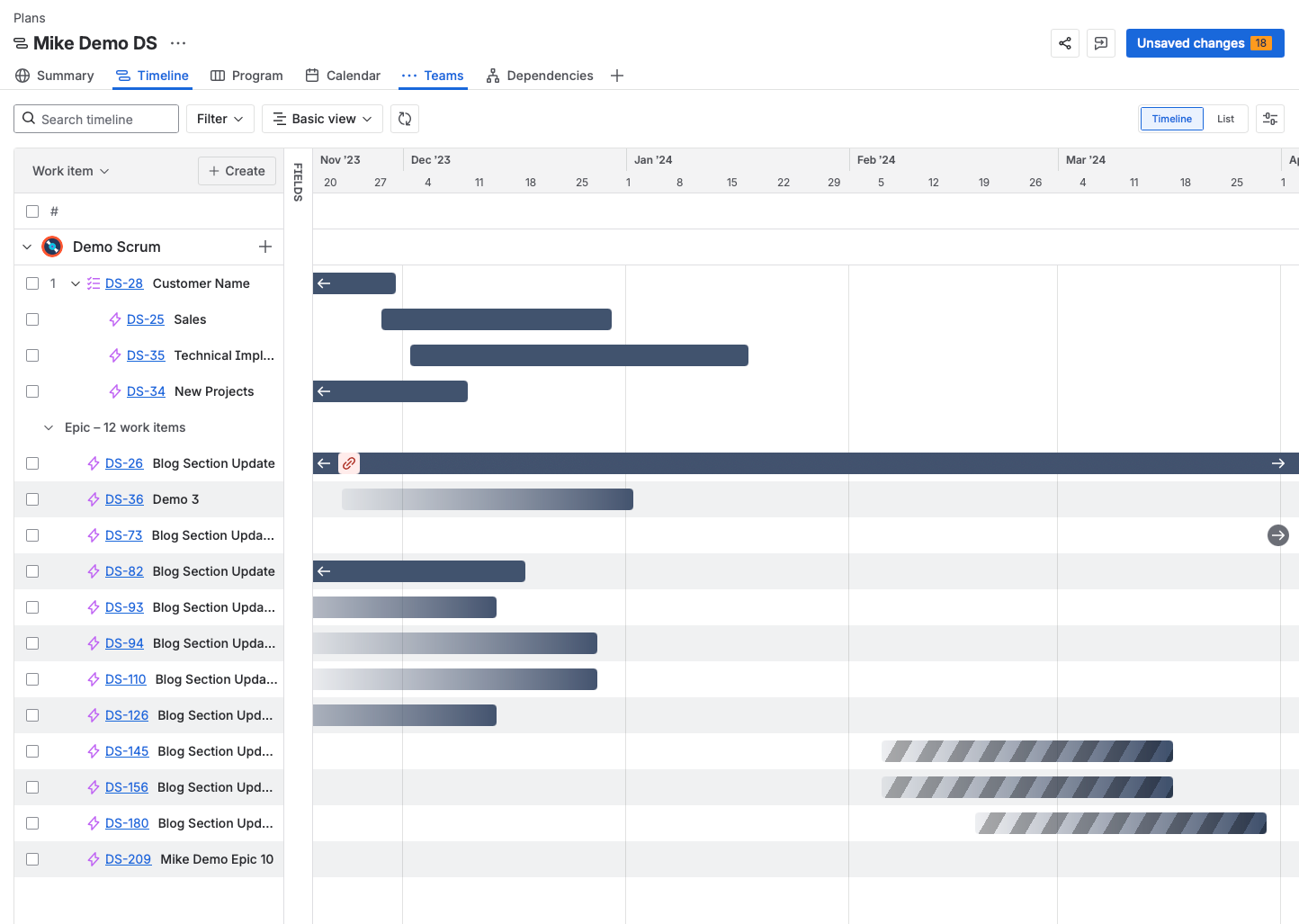
Jira Premium costs double Jira Standard.
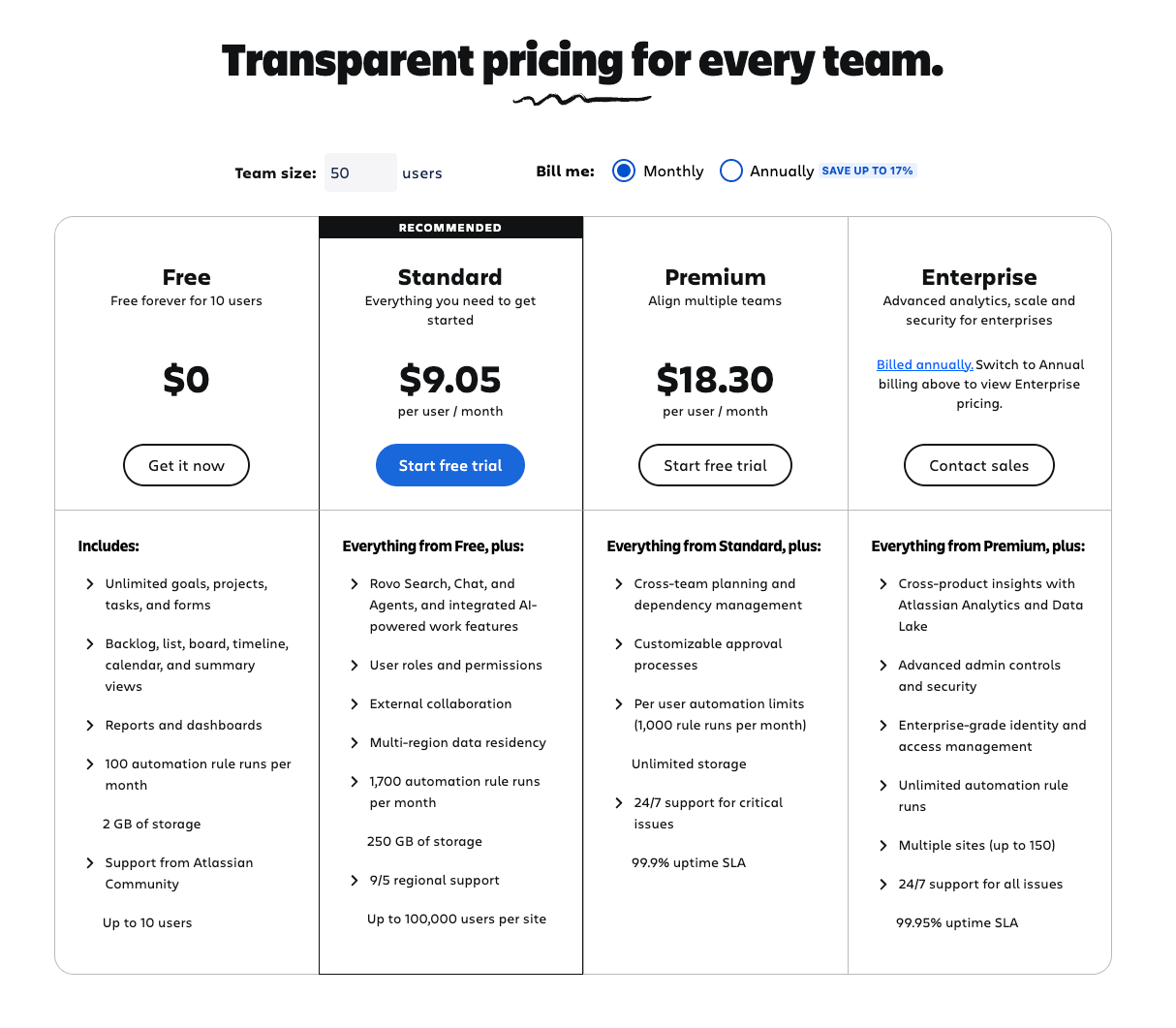
For a 50-person organization:
- Standard: ~$9.05/user/month
- Premium: ~$18.30/user/month
- Additional annual cost: ~$5,000
Is it worth it?
From my consulting perspective: If visibility is a problem, absolutely yes.
Why Organizations Upgrade to Premium
Based on my client experience, here are the real reasons organizations upgrade:
Reason #1: The "Helicopter View" (70% of cases)
- Leadership can't see portfolio status
- Multi-project visibility is manual and painful
- Stakeholders demand better roadmap communication
- Teams need to understand cross-project dependencies
Reason #2: Regulatory/Compliance Roadmaps (15% of cases)
- Auditors require documented roadmaps
- Contract deliverables need timeline visualization
- Government projects need program-level planning
Reason #3: Scale and Complexity (10% of cases)
- Managing 10+ projects simultaneously
- Resource allocation across teams
- Portfolio management requirements
Reason #4: Other Premium Features (5% of cases)
- Sandboxing (test configurations safely)
- Advanced automation rules
- IP allowlisting
- 24/7 support
Bottom Line: Plans is usually the primary driver for Premium upgrades.
Real-World Visibility Transformations
Case Study 1: 200-Person SaaS Company
The Problem:
- 12 engineering teams
- 8 product lines
- Quarterly planning took 3 full days
- Leadership had no real-time visibility
- Product managers maintained separate roadmap spreadsheets
Before Plans:
- Excel spreadsheets for roadmaps (immediately outdated)
- Weekly status meetings: 2 hours × 20 people = 40 hours/week
- Cross-team dependencies discovered during development (too late)
- Leadership made decisions based on 2-week-old information
After Plans Implementation:
- Single source of truth: One plan, all teams, live data
- Planning efficiency: Quarterly planning reduced to 1 day
- Proactive dependency management: Identified blockers 2 sprints in advance
- Leadership visibility: Real-time dashboards, 15-minute weekly check-ins
- Product manager relief: No more manual spreadsheet updates
ROI Calculation:
- Premium cost: ~$36,000/year (200 users)
- Time savings: 150 hours/month across leadership and PMs
- Value of proactive dependency management: Prevented 2 major release delays (~$200K impact)
- Net value: ~$500K/year
My Assessment: This is exactly why Plans exists. At scale, the ROI is undeniable.
Case Study 2: Marketing Agency (30 People)
The Problem:
- 20+ active client projects
- Creative, development, and account management teams
- Clients constantly asking for delivery timelines
- Resource allocation was guesswork
Before Plans:
- Project managers maintained separate roadmaps per client
- Resource conflicts discovered day-of
- Client reporting required 4 hours/week manual compilation
- Leadership had no portfolio view
After Plans Implementation:
- All clients in one plan: 20 projects, single timeline view
- Resource allocation: Visual capacity planning across teams
- Client reporting: Live Confluence pages embedded with Plans (auto-updated)
- Proactive resource management: Identified conflicts 2 weeks ahead
ROI Calculation:
- Premium cost: ~$5,500/year (30 users)
- Time savings: 20 hours/week (project managers + leadership)
- Client satisfaction: Fewer missed deadlines, better communication
- Net value: ~$50K/year
My Assessment: Even small teams benefit when managing multiple simultaneous projects with shared resources.
Case Study 3: Non-Profit (50 People)
The Problem:
- Grant-funded programs with strict timelines
- Board members needed quarterly roadmap updates
- Limited PM expertise (mostly program staff, not tech people)
- Funder reporting requirements
Before Plans:
- PowerPoint decks manually updated for each board meeting
- Program coordinators tracked work separately in Jira
- No unified view of organizational initiatives
- Board couldn't see how programs related to strategic goals
After Plans Implementation:
- Initiative-level planning: Each grant = initiative, programs = epics
- Board presentations: Live Confluence page embedded in board portal
- Funder reporting: Export timeline views to PDF for grant reports
- Strategic alignment: Visual connection between programs and mission goals
ROI Calculation:
- Premium cost: ~$9,000/year (50 users)
- Time savings: 16 hours/month (board prep + reporting)
- Grant compliance: Met all funder roadmap requirements
- Strategic clarity: Board engagement increased significantly
My Assessment: Plans works for non-technical organizations managing complex, multi-stakeholder initiatives.
How Plans Creates the "Helicopter View"
Let me walk you through exactly how Plans solves the visibility problem.
1. Unified Timeline Across Projects
The Problem: You have 8 projects. Each has its own Jira board. To see what's happening across all 8, you need to check 8 separate boards.
The Plans Solution:
- Create a new Plan
- Add all 8 projects as data sources
- View everything on a single Gantt chart
- Toggle between timeline and list views
- Filter by project, team, initiative, or custom criteria
What You See:
- All initiatives and epics from all 8 projects
- Timeline showing when each piece of work is scheduled
- Progress indicators (% complete for each epic)
- Dependencies between work across projects
- Resource allocation across teams
Impact: Leadership sees the entire portfolio in 30 seconds instead of 30 minutes.
2. Strategic Hierarchy Visualization
The Problem: Jira boards show epics, stories, and tasks. But what about the strategic level above epics? How do epics roll up to company goals?
The Plans Solution:
Level 1: Initiatives (Strategic Themes)
- Example: "2026 Mobile App Redesign," "EMEA Market Expansion"
- Duration: Quarters or years
- Owner: VP or C-level
Level 2: Epics (Major Features)
- Example: "User Authentication Overhaul," "Payment Gateway Integration"
- Duration: Sprints or months
- Owner: Product Manager
Level 3: Stories (User-Facing Work)
- Example: "As a user, I can reset my password via email"
- Duration: Days or weeks
- Owner: Development Team
Level 4: Tasks & Subtasks
- Technical implementation details
What You See in Plans:
- Initiatives at the top
- Epics nested under relevant initiatives
- Stories nested under epics
- Visual hierarchy showing how daily work ladders up to strategic goals
Impact: Teams understand why their work matters. Leadership sees how strategic goals decompose into executable work.
3. Dependency Mapping (The Hidden Gem)
The Problem: Team A's feature depends on Team B's API. But Team B is behind schedule. Nobody realizes this until Team A is blocked.
The Plans Solution:
Navigate to "Dependencies" in the left sidebar:
- Plans generates a visual dependency graph
- Shows all issue links (blocks, is blocked by, relates to)
- Highlights critical path items
- Identifies circular dependencies
- Allows adding new dependencies directly
What You See:
- Lines connecting dependent issues
- Color coding for dependency types
- Quick identification of bottlenecks
- Ability to filter by project, team, or severity
Impact: Proactive dependency management. Resolve blockers before they halt work.
Real Example: A fintech client discovered that 7 separate teams were waiting on a shared authentication service that was 2 sprints behind. Plans surfaced this immediately. They reallocated resources to the auth team, unblocking $2M in downstream work.
4. Scenario Planning (The "What-If" Superpower)
The Problem: Leadership asks: "What if we move the mobile launch to Q3 instead of Q2? How does that affect everything else?"
With standard Jira, answering this question requires:
- Moving issues manually
- Updating dates
- Breaking dependencies
- Hoping you remember to undo it if the scenario is rejected
The Plans Solution:
Plans operates in draft mode by default.
How It Works:
- Make any changes you want (move issues, adjust dates, add work)
- Changes exist only in Plans, not in Jira
- Test multiple scenarios (Scenario A, B, C)
- Compare scenarios side-by-side
- When ready, click "Review changes" and commit to Jira
What This Enables:
- Risk-free experimentation
- Rapid scenario modeling
- Stakeholder alignment before committing
- Data-driven decision making
Real Example: A healthcare tech company was deciding between:
- Scenario A: Ship v2.0 with all features in Q2 (aggressive)
- Scenario B: Ship v2.0 core in Q2, additional features in Q3 (conservative)
- Scenario C: Ship v1.5 in Q1, v2.0 in Q3 (iterative)
We modeled all three in Plans, showing resource allocation, dependencies, and risk factors. Leadership chose Scenario B based on visual evidence, not gut feel.
5. Executive Reporting Without Manual Work
The Problem: Every Monday, someone spends 3 hours compiling status reports for leadership from various Jira boards, spreadsheets, and Slack conversations.
The Plans Solution:
Summary View (Added Recently):
- Automatic progress rollups
- Initiative completion percentages
- Epic-level metrics
- Team velocity trends
- Risk indicators
What Clients Tell Me: "Mike, we don't need those custom dashboards you built anymore. We see everything we need in Plans."
Real Impact:
- Weekly reporting time: 3 hours → 15 minutes
- Data accuracy: Questionable → 100% (live from Jira)
- Stakeholder satisfaction: Higher (interactive, not static PDFs)
6. Confluence Integration (Stakeholder Game-Changer)
The Problem: Your executives don't live in Jira. They need roadmap visibility but don't want to learn a new tool.
The Plans Solution:
Embed Live Plans in Confluence:
- Configure your Plans view (timeline, filters, etc.)
- Click "Share" → "Confluence"
- Copy the generated link
- Open Confluence, create or edit a page
- Paste the link (Ctrl+V / Cmd+V)
- Publish the page
What Happens:
- Live, interactive Plans view embedded in Confluence
- Auto-updates when Plans data changes
- No screenshots, no manual exports
- Stakeholders see roadmaps in their comfortable environment
Use Cases:
- Executive status reports
- Board presentations
- Client-facing roadmaps
- Team retrospective documentation
Pro Tip: Create a "Leadership Dashboard" Confluence space with embedded Plans views for different initiatives. Leadership checks Confluence (which they already use), sees live roadmaps, no training required.
Plans vs. Timeline: Why Premium Is Worth It
Many clients ask: "We have Timeline in Standard. Why do we need Plans?"
Timeline (Jira Standard) Limitations:
❌ Single project only - Can't view across multiple projects
❌ Epic-focused - Issues not linked to epics don't appear
❌ No initiatives - Limited hierarchy (especially team-managed projects)
❌ No scenario planning - Changes apply immediately
❌ Limited reporting - Basic progress indicators only
❌ No Programs support - Can't use SAFe methodology
Plans (Jira Premium) Advantages:
✅ Multi-project - View your entire portfolio
✅ Full hierarchy - Initiatives → Epics → Stories → Tasks (5-6 levels)
✅ Scenario planning - Test changes before committing
✅ Advanced reporting - Summary views, capacity planning, metrics
✅ Dependency mapping - Visual dependency graphs
✅ Programs - SAFe methodology support
✅ Confluence integration - Embed live roadmaps
My Assessment:
Timeline is excellent for single-project planning. It's what I recommend for small teams working on one project.
Plans is essential for portfolio planning, strategic visibility, and multi-project coordination. It's what I recommend for organizations where "we can't see the big picture" is a recurring complaint.
Rule of Thumb:
- 1-2 projects: Timeline is sufficient
- 3+ projects OR strategic planning needs: Plans justifies Premium
- 10+ projects: Plans is non-negotiable
Understanding Programs (The SAFe Integration)
What Are Programs?
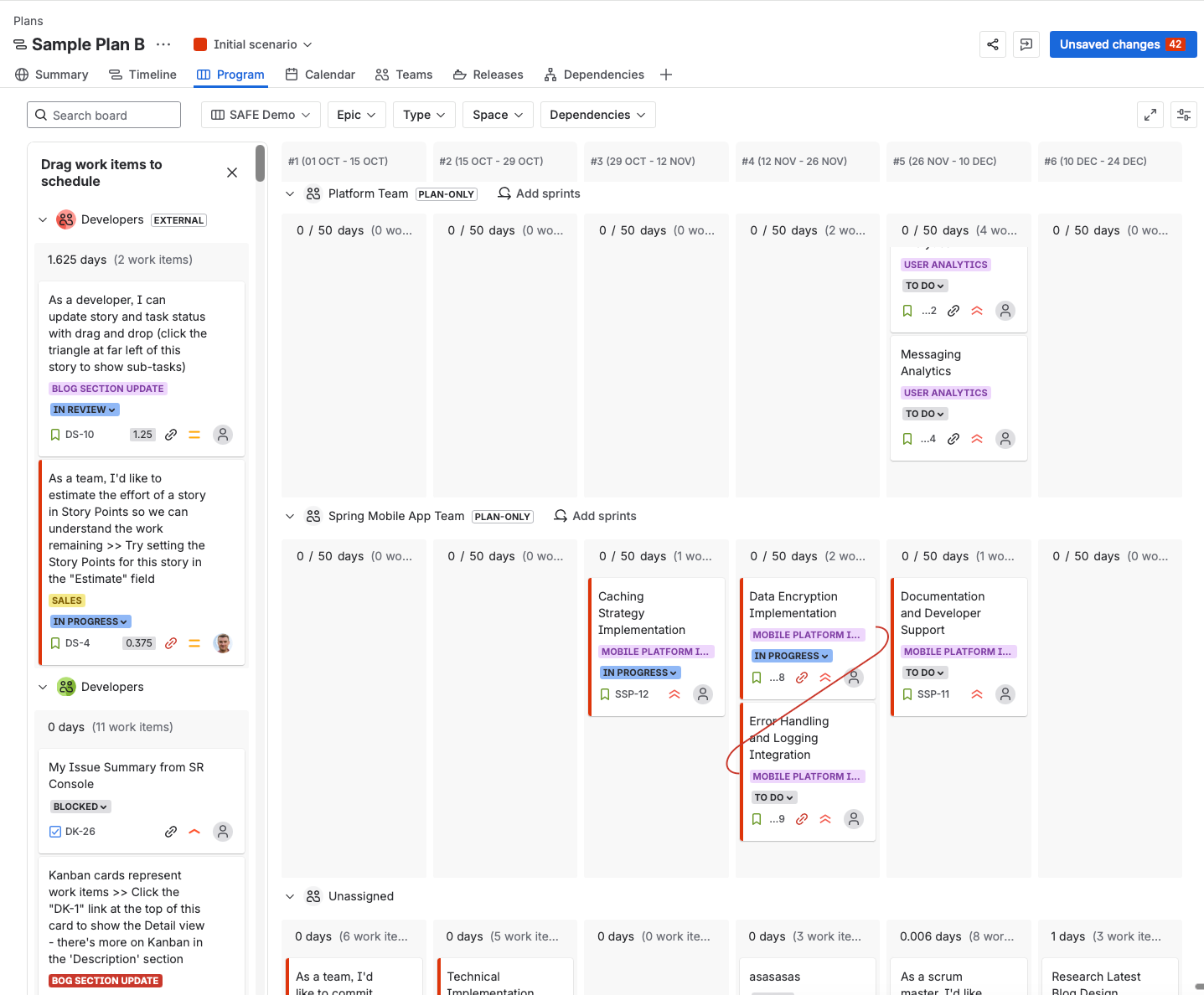
Programs are Jira Premium's implementation of the Scaled Agile Framework (SAFe) methodology.
SAFe Concepts:
- Agile Release Trains (ARTs): Teams aligned to deliver value together
- Program Increment (PI): Fixed timebox (typically 10-12 weeks)
- PI Planning: Big room planning event for ARTs
- Program Board: Visual representation of ART dependencies
Why Atlassian Added Programs
Programs come from Jira Align, Atlassian's enterprise-scale agile planning tool (think "Plans on steroids" for 1,000+ person organizations).
Atlassian has been gradually moving Jira Align features into Jira Premium, making enterprise agile more accessible.
Current Status (2026):
- Programs are in continuous evolution
- Not all Jira Align features are available yet
- Atlassian announces regular updates and enhancements
When to Use Programs
Use Programs if:
- ✅ Your organization follows SAFe methodology
- ✅ You have multiple Agile Release Trains
- ✅ You do quarterly PI Planning events
- ✅ You manage dependencies across 5+ teams
- ✅ You need program-level metrics and reporting
Skip Programs if:
- ❌ You don't follow SAFe (use standard Plans instead)
- ❌ Your teams are < 50 people
- ❌ You're new to Jira Premium (master Plans first)
How Programs Work in Plans
Navigate to "Programs" in the left sidebar:
1. Create Program Increments (PIs)
- Define PI duration (e.g., 10 weeks)
- Set PI objectives
- Assign teams to the PI
2. Map Teams to Objectives
- Connect teams to program objectives
- Visualize which teams contribute to which goals
- Track progress against objectives
3. Program Board View
- Visual board showing all teams
- Dependencies across teams
- Progress against PI goals
- Identify risks and blockers
4. PI Planning Support
- Used during big room planning
- Real-time dependency mapping
- Capacity planning across ARTs
- Commitment tracking
Real-World Programs Example
Large Financial Services Client (500+ People):
Structure:
- 3 Agile Release Trains (ARTs)
- ART 1: Mobile Banking (8 teams)
- ART 2: Backend Services (6 teams)
- ART 3: Customer Experience (5 teams)
- Quarterly PI Planning events
- 150+ people in PI Planning room
Before Programs:
- Used physical boards during PI Planning
- Manually tracked dependencies on sticky notes
- Post-PI, recreated everything in Jira (3-5 days work)
- Program boards became outdated within 2 weeks
After Programs Implementation:
- Live PI Planning using Plans + Programs
- Real-time dependency mapping on big screens
- Immediate Jira updates (no recreation needed)
- Program board stays current automatically
Impact:
- PI Planning efficiency: +40%
- Post-PI rework: Eliminated (5 days → 0 days)
- Program visibility: Continuous vs. quarterly snapshots
- Cross-ART dependencies: Proactively managed
My Take: If you're doing SAFe at scale, Programs is a game-changer. If you're not doing SAFe, you can safely ignore it and focus on core Plans features.
Implementation Best Practices (Consultant Tips)
1. Start Simple, Scale Gradually
Phase 1: Single Project (Week 1)
- Create your first plan
- Connect ONE project
- Explore the interface
- Get comfortable with timeline vs. list views
Phase 2: Multi-Project (Week 2-3)
- Add 2-3 related projects
- Test cross-project dependencies
- Experiment with scenario planning
Phase 3: Full Portfolio (Week 4+)
- Add all strategic projects
- Implement initiative hierarchy
- Train stakeholders
- Embed in Confluence
Why This Works: Trying to implement everything at once overwhelms teams. Incremental adoption builds confidence and expertise.
2. Define Your Hierarchy Standards
Before creating your first plan, decide:
Initiative naming convention:
- Example: "[2026-Q1] Mobile App Redesign"
- Include timeframe and strategic theme
Epic naming convention:
- Example: "[MOBILE] User Authentication"
- Include project identifier and feature area
Ownership rules:
- Initiatives: VP or C-level
- Epics: Product Managers
- Stories: Development Teams
Why This Matters: Consistency makes plans readable and maintainable as they scale.
3. Set Access Controls Appropriately
Plans should be private by default.
Who needs access:
- Full Access: Product managers, engineering managers, executives, PMO
- View-Only: Team leads, senior stakeholders
- No Access: Individual contributors (they work from boards, not plans)
Why: Plans are strategic tools for portfolio planning. Not everyone needs access. Limit visibility to those making portfolio-level decisions.
4. Use Programs Only If You're Doing SAFe
Don't force Programs if:
- Your organization doesn't follow SAFe
- You don't do formal PI Planning
- Teams don't understand Agile Release Trains
Why: Programs add complexity. If you're not using SAFe methodology, stick with standard Plans features.
5. Leverage Confluence Integration from Day 1
Create stakeholder-friendly views:
Executive Dashboard (Confluence Page):
- Embed: Initiative-level timeline
- Embed: Summary view with progress metrics
- Embed: High-level dependencies
Team Roadmap (Confluence Page):
- Embed: Epic-level timeline for specific teams
- Embed: Sprint capacity view
- Embed: Team-specific dependencies
Board Reports (Confluence Page):
- Embed: Strategic initiatives only
- Embed: Quarterly roadmap
- Embed: Risk and blocker summary
Why: Stakeholders get visibility without Jira training. Updates are automatic. You save hours on manual reporting.
6. Establish a Review Cadence
Weekly (15 minutes):
- Review uncommitted changes
- Check for new dependencies
- Update progress
Monthly (1 hour):
- Scenario planning for next quarter
- Resource reallocation decisions
- Strategic adjustments
Quarterly (Half day):
- Full roadmap review
- Initiative prioritization
- Long-term planning
Why: Plans data is only valuable if it's current. Regular reviews keep plans aligned with reality.
Common Mistakes to Avoid
Mistake 1: Creating Too Many Plans
The Problem: Different plans for every team, project, or initiative. 15 plans, nobody knows which is current.
The Fix: Start with 1-3 strategic plans:
- Enterprise Plan: All strategic initiatives
- Engineering Plan: All technical work (if large engineering org)
- Operations Plan: All operational work (if applicable)
Rule: Fewer, comprehensive plans beat many fragmented plans.
Mistake 2: Not Using Initiative Hierarchy
The Problem: Putting epics directly in plans without initiatives. No strategic grouping.
The Fix:
- Initiatives = Strategic themes (e.g., "Mobile First Strategy")
- Epics = Major features (e.g., "iOS App," "Android App")
- Stories = User-facing work (e.g., "User login")
Why: Without initiatives, plans are just fancy task lists. Initiatives create strategic clarity.
Mistake 3: Forgetting to Commit Changes
The Problem: Making planning decisions in Plans but forgetting to click "Review changes" and commit. Teams never see the updates.
The Fix:
- Set calendar reminders to review/commit changes
- Establish workflow: Plan on Monday, Commit by Tuesday
- Use scenario names to track what's been committed
Why: Uncommitted changes help no one. Plans is only valuable when it feeds back to Jira.
Mistake 4: Overcomplicating Initial Setup
The Problem: Trying to import all 50 projects, set up 6-level hierarchy, configure Programs, all on day 1.
The Fix: Remember Phase 1-3 implementation (see Best Practices above).
Why: Complexity kills adoption. Simple working plan beats perfect non-existent plan.
Mistake 5: Not Training Stakeholders
The Problem: Giving executives access to Plans without explaining how to read it. They're confused and frustrated.
The Fix:
- 30-minute walkthrough: "How to read our roadmap"
- Create Confluence pages with embedded views (they don't need Jira)
- Provide context: What initiatives mean, how to interpret progress
Why: The best tool in the world fails if users don't understand it.
Pricing and ROI Considerations
Understanding the Investment
Jira Premium Pricing:
- Up to 10 users: $18.30/user/month
- 11-50 users: Tiered pricing
- 51+ users: Volume discounts available
For a 50-person organization:
- Standard: ~$500/month = ~$600/year
- Premium: ~$1200/month = ~$12000/year
- Additional cost: ~$6,000/year
Is It Worth It?
Calculate your visibility pain:
Time spent on manual roadmap updates:
- Product managers: ___ hours/week
- Leadership meetings: ___ hours/week
- Status reporting: ___ hours/week
- Total: ___ hours/week × 52 weeks × $hourly rate = $___
Cost of poor visibility:
- Delayed decisions: $___
- Resource conflicts discovered late: $___
- Stakeholder frustration: $___
- Total: $___
If visibility pain > Premium cost: Plans pays for itself.
Typical Breakeven:
- Organizations with 3+ projects: Usually break even
- Organizations with 5+ projects: Clear ROI
- Organizations with 10+ projects: Massive ROI
The Consultant's Final Verdict
After 14 years implementing Jira across hundreds of organizations, here's my honest assessment:
You NEED Jira Plans (and Premium) if:
✅ You manage 3+ projects simultaneously
✅ Leadership struggles with portfolio visibility
✅ You have cross-project dependencies
✅ Stakeholders constantly ask for status updates
✅ Resource allocation is complex
✅ You need strategic roadmap communication
✅ Quarterly planning is painful
✅ You're following SAFe methodology
Action: Start the 30-day Premium trial. Set up Plans. If visibility improves, the investment is justified.
You DON'T Need Plans if:
❌ You have 1-2 simple projects
❌ Timeline in Standard meets your needs
❌ Visibility isn't a pain point
❌ Leadership doesn't need portfolio views
❌ Your team is < 20 people
Action: Save the money. Use Timeline and dashboards effectively.
For dashboard best practices, see my Jira Dashboards guide.
The "Helicopter View" Bottom Line
Visibility isn't optional for growing organizations.
Yes, you can hack together visibility with filters, dashboards, and spreadsheets. But at a certain scale, those hacks become more expensive (in time and frustration) than just using the right tool.
Plans IS that right tool.
The "helicopter view" it provides—seeing your entire portfolio, understanding dependencies, scenario planning, strategic alignment—is transformational for organizations managing complex, multi-project work.
From my consulting perspective: 98% of my clients struggle with visibility when they come to me. After implementing Plans, that problem essentially disappears. That's why most Premium upgrades are driven by the need for Plans.
If visibility is your pain point, Plans is your solution.
Next Steps: Getting Started with Plans
Week 1: Trial and Explore
- [ ] Start Jira Premium 30-day trial
- [ ] Create a demo plan
- [ ] Connect 1 real project
- [ ] Explore timeline and list views
- [ ] Test scenario planning
Week 2: Expand and Integrate
- [ ] Add 2-3 more projects
- [ ] Set up initiative hierarchy
- [ ] Map some dependencies
- [ ] Embed in a Confluence page
- [ ] Share with one stakeholder
Week 3: Operationalize
- [ ] Establish review cadence
- [ ] Train key stakeholders
- [ ] Document naming conventions
- [ ] Commit your first real scenario
Week 4: Scale
- [ ] Add remaining strategic projects
- [ ] Create executive dashboard (Confluence)
- [ ] Set up regular reporting
- [ ] Evaluate ROI and decide on Premium purchase
Need Expert Help?
I offer:
Plans Implementation Workshop (4 hours)
- Portfolio assessment
- Plans setup and configuration
- Hierarchy design
- Stakeholder training
- Confluence integration
Need help setting up Plans? Book a strategy call - I've done hundreds of these implementations.
Strategic Planning Consultation (2 hours)
- Visibility assessment
- Plans vs. alternatives analysis
- ROI calculation
- Implementation roadmap
1:1 Consulting
- Custom portfolio setup
- Programs (SAFe) implementation
- Executive training
- Ongoing optimization
Book a free 15-minute discovery call: calendly.com/projecflow/jira-strategy-call