Jira Data Center to Cloud Migration: A Consultant's Honest Guide (2026 Edition)

The Clock Is Ticking: Atlassian's Data Center End-of-Life Timeline
Atlassian has made it official: Data Center is being retired, and the countdown has begun.
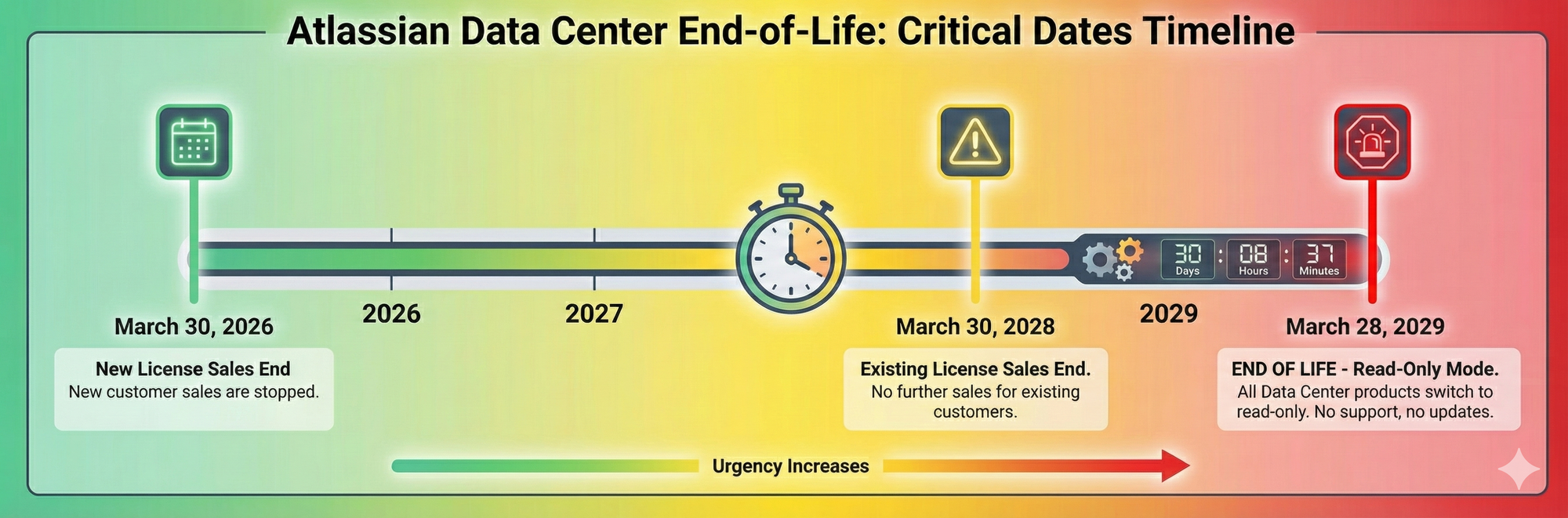
Here are the critical dates every Data Center customer needs to know:
- March 30, 2026: End of license sales to new customers (16 months away)
- March 30, 2028: End of license sales to existing customers (no renewals or expansions)
- March 28, 2029: END OF LIFE - All Data Center instances become read-only
What this means:
You have approximately 3 years to migrate from Data Center to Cloud. After March 28, 2029, your Data Center environment will expire, support will end, and your instance will be locked in read-only mode.
After 14 years of consulting for organizations like BBC, Vodafone, NHS, and Lloyds Bank, I've guided dozens of Data Center migrations. This isn't my first rodeo—and based on what I've seen, most organizations are underestimating how complex this will be.
In this guide, I'll walk you through:
- The three migration approaches (and which one I actually recommend)
- Why "lift and shift everything" is almost always a bad idea
- The hidden challenges nobody talks about (especially app/plugin migration)
- Real-world timelines from actual migrations
- How to avoid the 6-month nightmare one of my clients experienced
Let's dig in.
The Three Migration Approaches
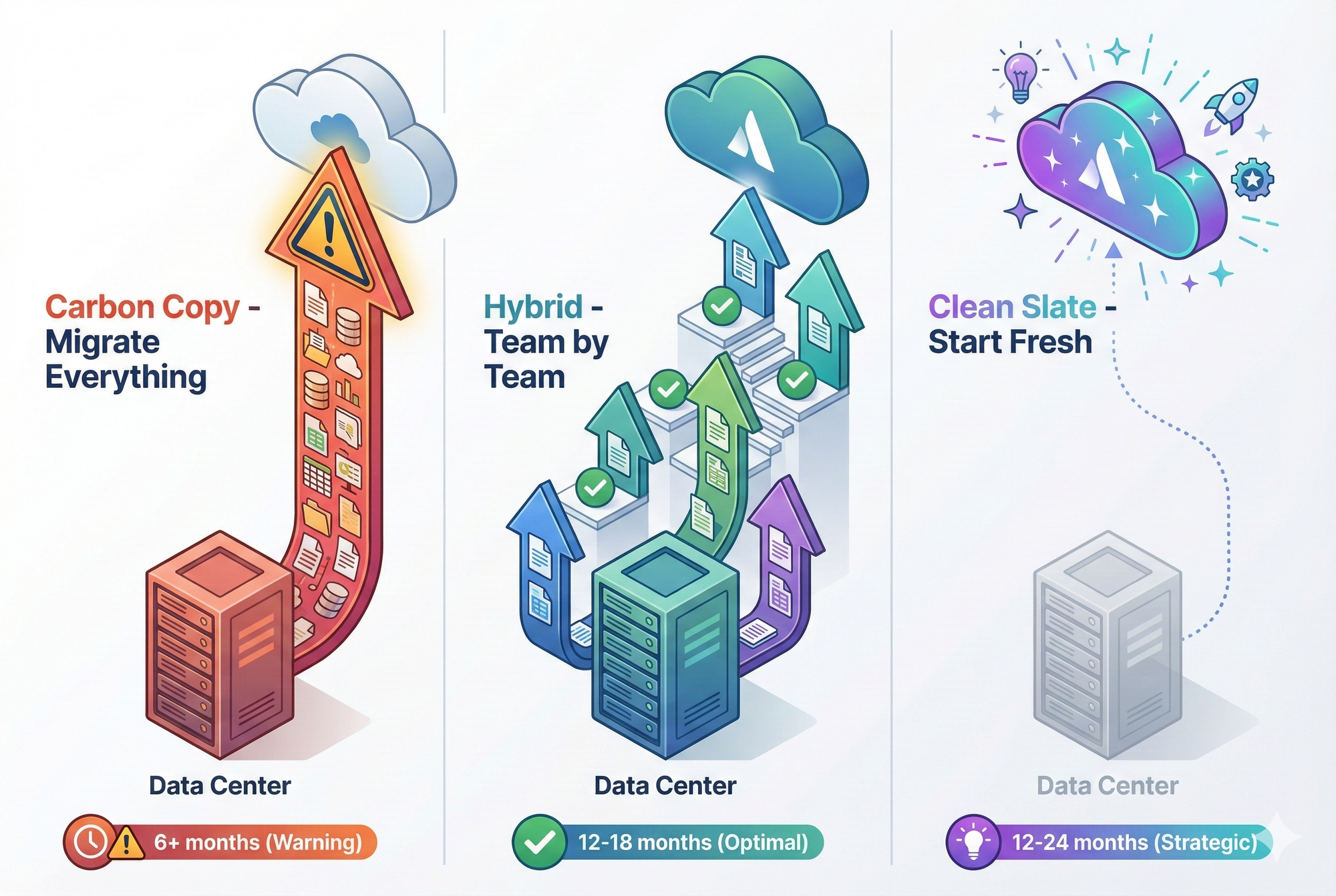
Every Data Center to Cloud migration falls into one of three categories. You've probably seen these described in various ways, but here's what they actually mean in practice:
Approach 1: Carbon Copy (Lift and Shift Everything)
What it is: Migrate your entire Data Center instance to Cloud—every project, every page, every configuration, every historical issue.
Who chooses this:
- Organizations terrified of losing data
- Teams without time to evaluate what matters
- Companies with strict compliance/audit requirements
- Clients who think "we might need it someday"
Atlassian's tool: Atlassian Migration Assistant (Cloud Migration Assistant)
Why it sounds appealing:
- No perceived data loss
- Single migration event
- Minimal upfront decision-making
- Complete historical continuity
Approach 2: Hybrid Migration (Staged Team-by-Team Approach)
What it is: Migrate in stages, moving specific teams or projects at a time. Some projects get migrated as-is, others get rebuilt fresh, and teams transition incrementally.
Who chooses this:
- Large organizations (1,000+ users)
- Companies with diverse team needs
- Organizations willing to invest in thoughtful planning
- Teams who want to practice and learn as they go
Why I usually recommend this:
- Reduces risk through staged rollout
- Allows practice on "live organisms" (real teams)
- Avoids the "everything outdated on Day 2" problem
- Provides flexibility to rebuild projects that need it
Approach 3: Clean Slate (Start Fresh in Cloud)
What it is: Don't migrate anything. Build fresh Cloud projects, provide training, move teams on specific cutover dates. Data Center stays in read-only mode for reference.
Who chooses this:
- Organizations with messy, unmaintainable Data Center instances
- Teams wanting to eliminate years of technical debt
- Companies embracing Cloud-native features from day one
- Clients open to treating migration as an optimization opportunity
Why it works:
- Forces best practices and modern architecture
- Eliminates years of accumulated clutter
- Gives teams ownership of new environment
- Historical data remains accessible (read-only) but doesn't pollute Cloud
The Consultant's Take: Why Carbon Copy Is Almost Always Wrong
The Tempting Promise of Carbon Copy
On paper, the carbon copy approach makes perfect sense:
"We'll just move everything over. Nothing gets left behind. No one has to decide what's important. One migration, done."
The reality? This approach creates more problems than it solves.
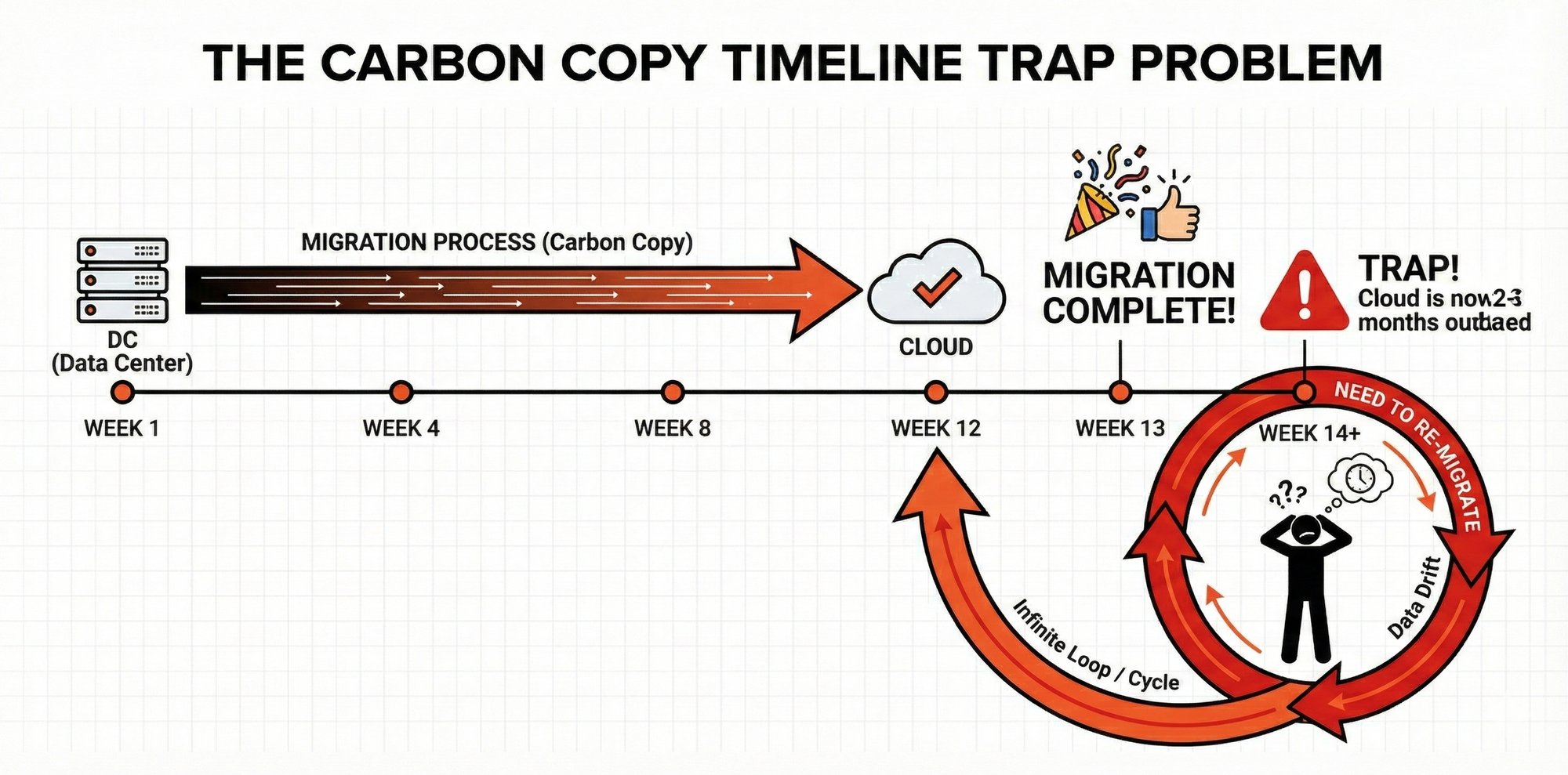
Problem 1: The Migration Timeline Trap
Here's what happens with a carbon copy migration:
Week 1-4: Plan the migration, prepare environments Week 5-12: Run the Atlassian Migration Assistant, copy everything over Week 13: Migration complete! 🎉
Week 14: Realize that during the 12 weeks of migration, teams kept working in Data Center. The Cloud instance is now 2-3 months out of date.
The Nightmare:
You now have to:
- Set a hard cutover date ("On March 15, we switch to Cloud")
- Freeze Data Center (or run a second migration)
- Deal with teams who created new projects, issues, pages during migration
- Merge or reconcile changes made in both systems
Real Example from a Client:
A 500-person financial services company attempted a carbon copy migration. They spent 6 months trying to coordinate a cutover date that worked for all teams.
What went wrong:
- Migration took 10 weeks
- By completion, Cloud was 2.5 months outdated
- They ran a second migration to catch up
- That migration took 8 weeks
- By that completion, Cloud was outdated again
- They ended up in an infinite loop: migrate, fall behind, re-migrate, repeat
The Breaking Point: Leadership finally said "enough" and switched to a staged approach, migrating 2-3 teams per month. Total time: 18 months. But it worked.
Key Lesson: At enterprise scale (500+ users, 50+ projects), carbon copy migrations are logistically impossible unless you can freeze Data Center entirely—which most organizations cannot do.
Problem 2: You're Migrating Years of Accumulated Mess
Data Center instances are like attics. Over time, they accumulate:
- Obsolete projects that ended 3 years ago but were never archived
- Duplicate spaces created when teams couldn't find the original
- Broken workflows that nobody remembers why they exist
- Orphaned custom fields from projects long since deleted
- Marketplace apps installed in 2018, never uninstalled, no longer used
Complex workflows often need simplification. My Workflow Guide shows how.
Custom fields are a major complexity driver. See my Custom Fields Masterclass for cleanup strategies.
Carbon copy migrates ALL of this.
Real Impact:
- Storage costs: Atlassian Cloud charges for storage. Migrating 5TB of historical junk you don't need costs real money.
- Search noise: Every outdated page, closed project, and archived space makes search worse in Cloud.
- Performance degradation: Cloud instances can slow down with excessive data volume.
- Compliance risk: Old projects may contain sensitive data that should've been deleted years ago.
My Rule: If you wouldn't bother clicking on it in Data Center, don't migrate it to Cloud.
Problem 3: The Tooling Is Great... But That's Not the Problem
Let me be clear: Atlassian's Migration Assistant is excellent.
I've used it dozens of times. It's surprisingly robust:
✅ Fast (considering the volume of data)
✅ Reliable (rarely crashes)
✅ Resilient (can handle broken configurations and keep going)
✅ Comprehensive (migrates projects, spaces, users, permissions, workflows)
A few years ago, the tool would crash on errors. Now it logs them and continues. This is a massive improvement.
But here's the thing: The technical migration isn't the hard part.
The hard part is:
- Deciding what to migrate
- Coordinating cutover dates across teams
- Managing the "Cloud is outdated" problem
- Handling the human and organizational change
- Dealing with plugin/app migration (more on this later)
Bottom Line: Having a great tool doesn't make carbon copy the right strategy—it just makes the wrong strategy execute faster.
Why I Usually Recommend the Hybrid Approach
How the Hybrid Approach Works
Instead of one massive migration, you migrate in stages, team by team or project by project.
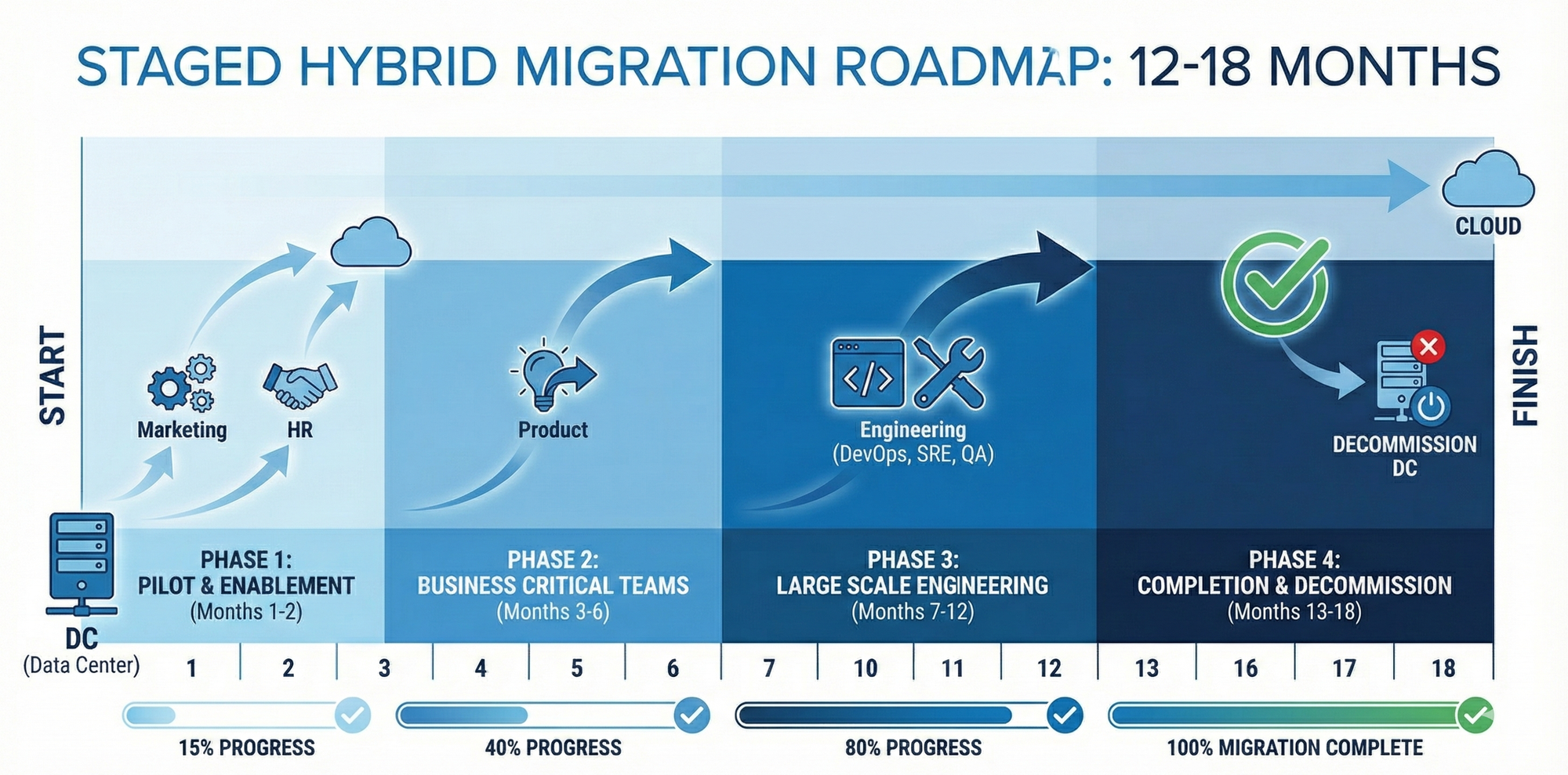
Typical Timeline (200-500 Person Organization):
Month 1-2: Planning and Pilot
- Identify "light" teams to migrate first (e.g., Marketing, HR, Operations)
- Migrate 2-3 projects as a pilot
- Test workflows, permissions, integrations
- Document issues and refine process
Month 3-6: Early Adopters
- Migrate non-critical teams
- Build momentum and confidence
- Provide training and support
- Iterate on migration process
Month 7-12: Core Teams
- Migrate engineering, product, support teams
- More complex projects and workflows
- Heavier plugin/app dependencies
- Larger user bases
Month 13-18: Final Teams and Cleanup
- Migrate remaining teams
- Decommission Data Center (or move to read-only)
- Final data validation
- Close out the project
Total Duration: 12-18 months (vs. 6+ months for a failed carbon copy attempt)
Why This Works
1. You Practice on Real Teams
Sounds crazy, but it's actually smart.
Your first migration will have issues. Better to discover those issues with a 10-person Marketing team than a 100-person Engineering org.
Lessons learned:
- Permission mapping quirks
- Workflow limitations in Cloud
- App compatibility issues
- User training gaps
By the time you migrate critical teams, you've refined the process 5-10 times.
2. Teams Can Keep Working
With staged migrations:
- Team A moves to Cloud
- Team B still in Data Center
- No organization-wide freeze
- No "hard cutover" nightmares
Teams transition when ready, not when the calendar says so.
3. You Can Mix Migration Styles
Team 1 (Marketing): Fresh rebuild—their Data Center project was a mess Team 2 (Finance): Carbon copy—compliance requires preserving exact history Team 3 (Engineering): Hybrid—migrate last 2 years of issues, archive the rest
Different teams, different needs, different approaches.
4. Cloud Doesn't Get Outdated
With staged migrations, only the migrated teams are in Cloud. The instance stays current because:
- Teams actively using it are the teams that migrated
- No gap between "migration complete" and "actual cutover"
- Data Center teams stay in Data Center until their migration
No timeline trap. No infinite re-migration loop.
Real Success Story: 300-Person SaaS Company
The Setup:
- 300 users across 8 teams
- 12 years of Data Center history
- Massive technical debt (workflows nobody understood)
- 50+ marketplace apps installed
The Approach (Hybrid):
Month 1-2:
- Migrated Marketing team (10 people, 2 projects)
- Discovered workflow mapping issues
- Refined documentation process
Month 3-4:
- Migrated HR and Ops teams (25 people combined)
- Tested permission schemes
- Validated SSO integration
Month 5-8:
- Migrated Product teams (75 people)
- Rebuilt workflows from scratch (old ones were broken)
- Integrated with Cloud-native apps
Month 9-12:
- Migrated Engineering teams (150 people)
- Complex plugin migration (more on this below)
- Heavy Confluence use (10K+ pages)
Month 13:
- Decommissioned Data Center
- Left in read-only mode for 6 months for reference
- Final cleanup and optimization
Result:
- 13-month migration, zero downtime
- Teams learned Cloud features gradually
- Eliminated 10+ years of technical debt
- Cloud instance is clean, modern, optimized
Cost: Lower than expected (no repeated migrations, controlled approach)
The Clean Slate Approach: When It Makes Sense
Who Should Consider This?
The clean slate approach isn't for everyone, but it's perfect for:
Organizations with:
- Severely broken Data Center instances
- Years of unmanageable customizations
- Teams willing to embrace change
- Strong training and change management capabilities
Signs you need a clean slate:
- "Our workflows make no sense and nobody knows why they exist"
- "We have 200 custom fields and half are unused"
- "Our Confluence is a graveyard of outdated documentation"
- "We've wanted to restructure for years but couldn't"
How Clean Slate Works
Step 1: Build Fresh Cloud Projects
Create new, modern project structures in Cloud:
- Simplified workflows
- Minimal custom fields
- Cloud-native apps
- Best practice configurations
Step 2: Train Teams
Comprehensive training before cutover:
- Cloud interface differences
- New workflows
- Automation opportunities
- Best practices
Step 3: Staged Cutovers
Teams switch on specific dates:
- Team 1: March 1 cutover
- Team 2: March 15 cutover
- Team 3: April 1 cutover
Step 4: Data Center → Read-Only
After all teams migrate:
- Set Data Center to read-only
- Keep accessible for 6-12 months
- Teams can reference historical data
- Eventually decommission
The Counter-Intuitive Truth
"But won't we lose all our data?"
No. You're not deleting Data Center. It stays accessible in read-only mode.
What actually happens:
Week 1-4 post-cutover: Teams reference Data Center frequently
Month 2-3: References drop to ~20% of initial frequency
Month 4-6: References drop to ~5%
Month 7+: Rarely accessed
The Pattern: Teams need historical context less than they think.
What they actually need:
- Last 6-12 months of work (actively migrate this)
- Occasional reference to old decisions (read-only Data Center is fine)
- Recent project documentation (selectively migrate)
Real Example:
A 100-person tech company went full clean slate. They were terrified of losing data.
What happened:
- Month 1: 40 tickets asking "Where's my old project?"
- Month 2: 8 tickets
- Month 3: 1 ticket
- Month 4+: Zero tickets
The Lesson: Historical data anxiety is almost always worse than the actual need for it.
The Hidden Nightmare: Plugin/App Migration
Here's what nobody tells you about Data Center to Cloud migration:
The technical migration is usually straightforward.
The plugin migration is where organizations bleed time and money.
The App Compatibility Problem
Data Center Apps ≠ Cloud Apps
Many plugins available in Data Center either:
- ❌ Don't exist in Cloud
- ❌ Have limited Cloud versions
- ❌ Require completely different configurations
- ❌ Can't migrate data between Data Center and Cloud versions
Common Problem Apps:
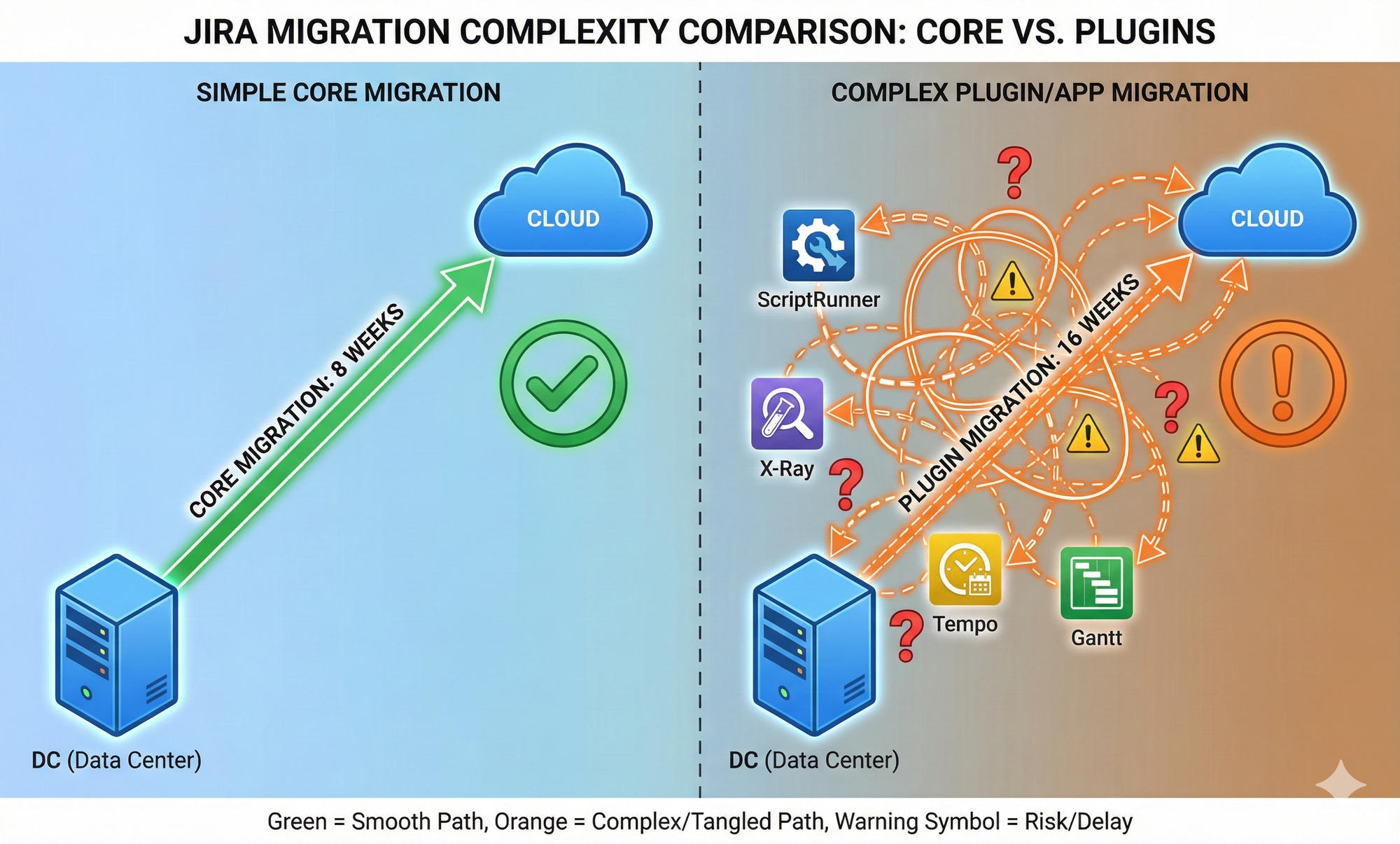
1. Gantt Chart Apps
- Data Center: Heavy, feature-rich
- Cloud: Often simplified or non-existent
- Migration: Gantt data doesn't transfer
2. ScriptRunner
- Data Center: Groovy scripts, deep system access
- Cloud: JavaScript, limited API access
- Migration: Scripts must be completely rewritten
3. X-Ray (Test Management)
- Data Center: Full-featured test management
- Cloud: Available, but data migration is complex
- Migration: Often takes longer than core Jira migration
4. Tempo Timesheets
- Data Center: Used to have migration issues
- Cloud: Now supported by Migration Assistant
- Migration: Generally works, but validate thoroughly
The Pre-Migration App Audit
Before you migrate anything, do this:
Step 1: List Every App
Document every plugin installed in Data Center:
- App name and version
- Who uses it
- What features they actually use
- How critical is it
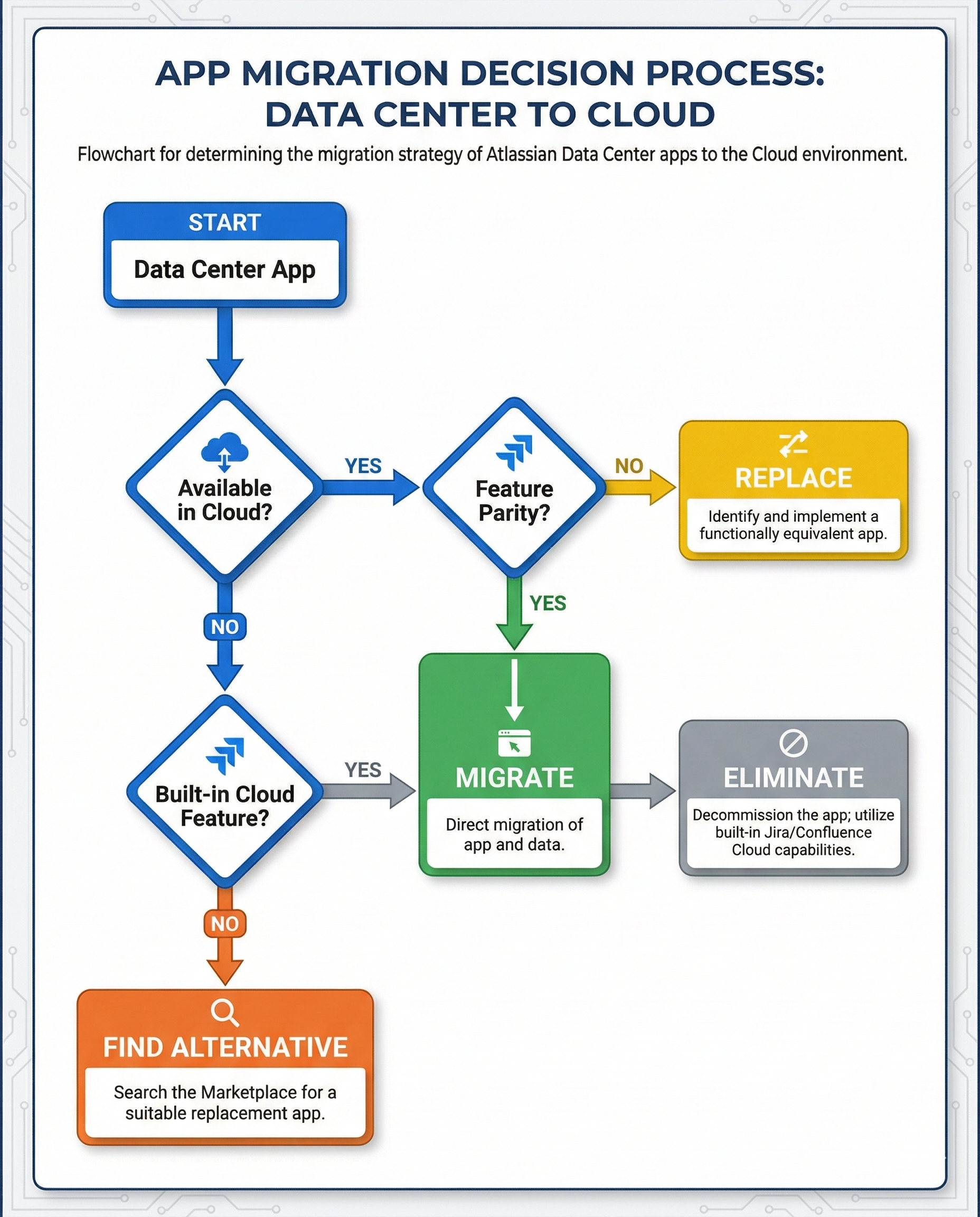
Step 2: Check Cloud Availability
For each app:
- Is there a Cloud version?
- Does it have feature parity?
- Can it migrate data?
- What's the pricing (Cloud apps often cost differently)
Step 3: Make Hard Decisions
For each app, decide:
Option A: Migrate to Cloud version
- Cloud version exists and is acceptable
- Data migration path is clear
- Budget for Cloud licensing
Option B: Replace with built-in Cloud features
- Cloud has native functionality now
- App is no longer necessary
- Train users on Cloud alternatives
Option C: Replace with different Cloud app
- Original app unavailable or inadequate in Cloud
- Find and test alternative
- Plan data migration or fresh start
Option D: Eliminate entirely
- Audit shows app is barely used
- Functionality not actually needed
- Remove from scope
Real Example: The ScriptRunner Nightmare
Client: 200-person software company
Problem: 150+ Groovy scripts in ScriptRunner (Data Center)
Challenge: ScriptRunner Cloud uses JavaScript, not Groovy
The Work:
- Audit all 150 scripts
- Discovered 80 were unused (delete)
- 40 could be replaced with Cloud Automation (rebuild)
- 30 required JavaScript rewrites (rewrite)
Timeline:
- Core Jira migration: 8 weeks
- ScriptRunner migration: 16 weeks
The lesson: App migration took double the time of the core migration.
My Plugin Migration Recommendations
1. Start the App Audit 6 Months Before Migration
This is not a "migration week" activity. Start early.
2. Assume 30-50% of Apps Will Be Problematic
Plan for it. Budget for it. Don't assume smooth sailing.
3. Consider Clean Slate for Heavily Customized Projects
If a project has 15+ custom apps with deep integrations, rebuilding it fresh in Cloud may be faster than migrating.
4. Test App Migrations in Sandbox First
Atlassian offers Cloud sandboxes. Use them. Test every app migration before production.
5. Prepare Users for App Differences
Cloud versions of apps often look/behave differently. Train users in advance.
Migration Timelines: What to Actually Expect
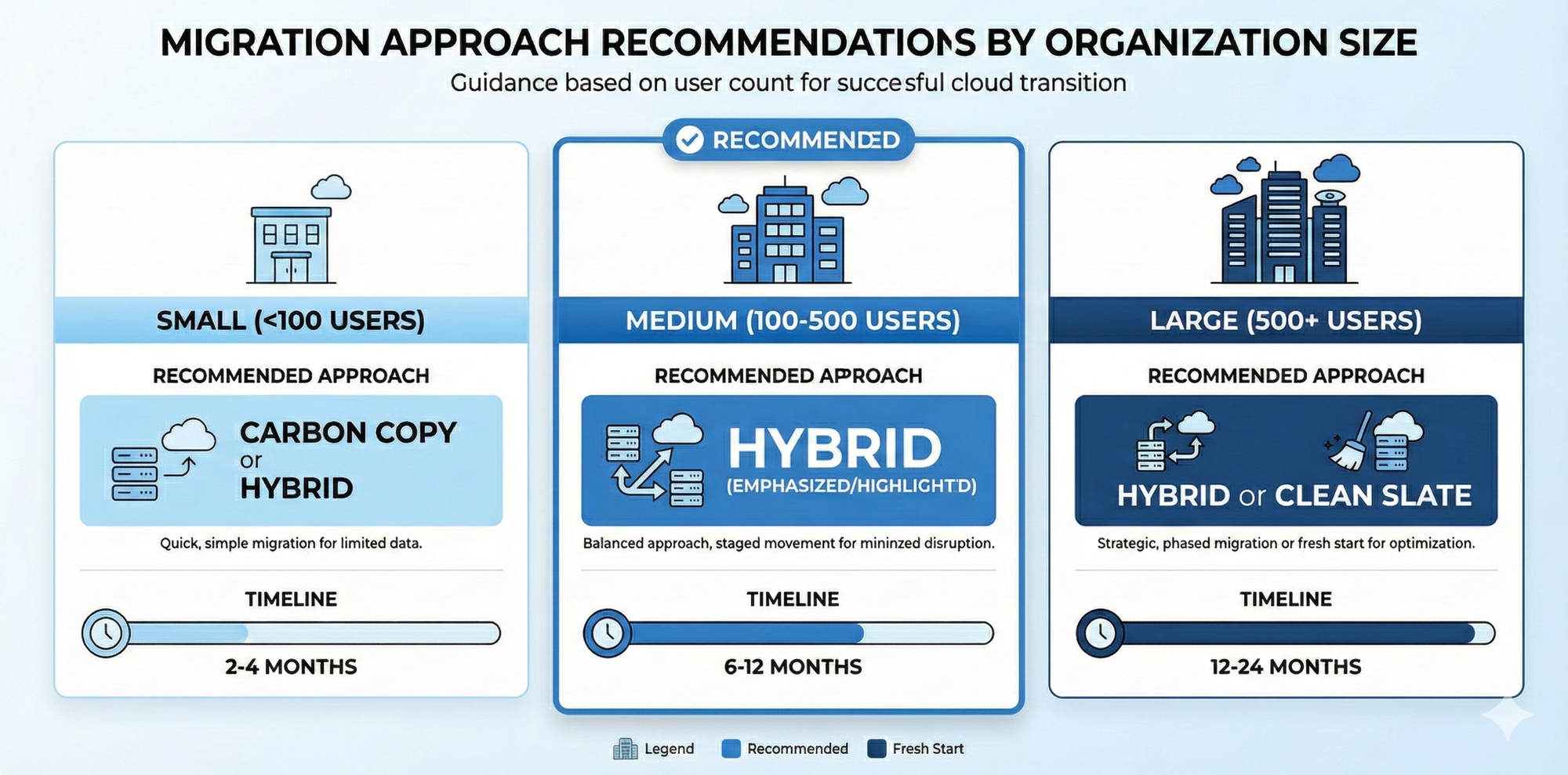
Small Organizations (< 100 Users)
Approach: Hybrid or Carbon Copy
Timeline: 2-4 months
Key Factors:
- Fewer projects to migrate
- Simpler workflows
- Fewer app dependencies
Typical Breakdown:
- Planning: 2-4 weeks
- Pilot migration: 2 weeks
- Full migration: 4-8 weeks
- Cleanup: 2 weeks
Medium Organizations (100-500 Users)
Approach: Hybrid (recommended)
Timeline: 6-12 months
Key Factors:
- Multiple teams with different needs
- More complex workflows and permissions
- Significant app dependencies
Typical Breakdown:
- Planning and app audit: 2-3 months
- Pilot migrations: 1-2 months
- Staged team migrations: 4-6 months
- Final cleanup: 1-2 months
Large Organizations (500+ Users)
Approach: Hybrid or Clean Slate
Timeline: 12-24 months
Key Factors:
- Enterprise complexity
- Heavy customization
- Regulatory/compliance requirements
- Massive data volumes
Typical Breakdown:
- Planning and strategy: 3-6 months
- App audit and replacement planning: 3-4 months
- Staged migrations: 6-12 months
- Decommissioning and cleanup: 2-3 months
What Drives Longer Timelines?
1. App/Plugin Complexity
- Heavy ScriptRunner usage: +3-6 months
- Complex test management (X-Ray): +2-4 months
- Custom integrations: +2-3 months
2. Data Volume
- 100K+ Jira issues: +2-3 months
- 50K+ Confluence pages: +1-2 months
- Large file attachments: +1 month
3. Organizational Complexity
- Multiple business units: +3-6 months
- Strict compliance requirements: +2-4 months
- Distributed global teams: +2-3 months
4. Change Management
- Low technical literacy: +2-3 months (training)
- Resistance to change: +1-2 months (stakeholder management)
- Poor project governance: +3-6 months (delays and rework)
Common Migration Mistakes (And How to Avoid Them)
Mistake 1: Starting Too Late
The Problem: "We have until 2029, let's start in 2027."
The Reality:
- App vendors may stop supporting Data Center versions earlier
- Atlassian support decreases over time
- Other organizations will be migrating (consultant availability drops)
- You'll compete for Atlassian's migration assistance resources
The Fix: Start planning in 2026, even if you don't migrate until 2027.
Mistake 2: Underestimating App Migration
The Problem: "We'll migrate the apps after we migrate Jira."
The Reality: Apps are often the most time-consuming part.
The Fix: Audit apps FIRST, before planning anything else.
Mistake 3: Not Testing in Sandbox
The Problem: "We'll migrate directly to production Cloud."
The Reality: You'll discover issues during the migration that you can't fix without starting over.
The Fix: Always migrate to a Cloud sandbox first, validate, then migrate to production.
Mistake 4: Skipping User Training
The Problem: "Cloud is similar enough to Data Center, users will figure it out."
The Reality: Interface differences, permission changes, and missing apps confuse users and tank adoption.
The Fix: Comprehensive training before each team cutover.
Mistake 5: Not Keeping Data Center in Read-Only
The Problem: "We'll decommission Data Center immediately after migration."
The Reality: Teams will need historical context for months afterward.
The Fix: Keep Data Center accessible (read-only) for 6-12 months post-migration.
The Consultant's Migration Checklist
Phase 1: Planning (3-6 Months Before)
- [ ] Audit all Data Center projects and spaces
- [ ] Document all installed apps/plugins
- [ ] Check Cloud app availability and compatibility
- [ ] Assess data volume (projects, issues, pages, attachments)
- [ ] Identify critical vs. archival content
- [ ] Choose migration approach (Carbon Copy / Hybrid / Clean Slate)
- [ ] Create project timeline
- [ ] Assign migration team roles
- [ ] Budget for Cloud licensing (including apps)
Phase 2: App Strategy (2-4 Months Before)
- [ ] For each app, decide: Migrate / Replace / Eliminate
- [ ] Test app migrations in sandbox
- [ ] Identify gaps in Cloud functionality
- [ ] Plan workarounds or alternative solutions
- [ ] Secure budget for new Cloud app licenses
- [ ] Document app configuration differences
Phase 3: Pilot Migration (1-2 Months Before)
- [ ] Set up Cloud sandbox environment
- [ ] Migrate 1-2 low-risk projects
- [ ] Test workflows, permissions, integrations
- [ ] Validate app functionality
- [ ] Document issues and lessons learned
- [ ] Refine migration process
- [ ] Update timeline based on pilot results
Phase 4: Production Migration (Varies)
For Carbon Copy:
- [ ] Schedule hard cutover date
- [ ] Freeze Data Center (or plan second migration)
- [ ] Run Atlassian Migration Assistant
- [ ] Validate data integrity
- [ ] Switch DNS/URLs to Cloud
- [ ] Communicate to all users
For Hybrid:
- [ ] Migrate Team 1 projects
- [ ] Cutover Team 1 on scheduled date
- [ ] Provide Team 1 support and training
- [ ] Document issues and refine
- [ ] Repeat for Teams 2, 3, 4... incrementally
For Clean Slate:
- [ ] Build fresh Cloud projects
- [ ] Train each team before cutover
- [ ] Cutover teams on scheduled dates
- [ ] Migrate selective critical historical data
- [ ] Provide ongoing support
Phase 5: Post-Migration (1-3 Months After)
- [ ] Monitor Cloud performance and usage
- [ ] Address user issues and questions
- [ ] Validate all workflows functioning
- [ ] Confirm all integrations working
- [ ] Set Data Center to read-only
- [ ] Document Cloud governance policies
- [ ] Plan Data Center decommissioning date (6-12 months later)
Atlassian's Support Programs
Atlassian offers migration assistance depending on organization size:
Under 1,000 Users
Atlassian Ascend Program:
- Self-service tools and resources
- Migration guides and documentation
- Community support
Over 1,000 Users
Atlassian FastShift Program:
- Strategic partnership with Atlassian
- Dedicated migration support
- Accelerated timelines (12-16 months → 2-6 months claimed)
- Free for qualifying organizations
My Take: FastShift is legitimately helpful for large enterprises. Engage early if you qualify.
Final Recommendations: The Consultant's Verdict
After guiding dozens of Data Center to Cloud migrations, here's my honest advice:
For Small Organizations (< 100 Users)
Recommended Approach: Carbon Copy or Hybrid
Why: Your data volume is manageable, migration is straightforward, and the "outdated instance" problem is solvable with a quick re-run.
Timeline: 2-4 months
Watch Out For: App compatibility (audit this first)
For Medium Organizations (100-500 Users)
Recommended Approach: Hybrid (staged team-by-team)
Why: Too large for carbon copy to avoid timeline traps, but not so large that clean slate is the only option. Staged migration reduces risk and allows practice.
Timeline: 6-12 months
Watch Out For:
- App migration complexity
- Cross-team dependencies
- Change management
For Large Organizations (500+ Users)
Recommended Approach: Hybrid or Clean Slate
Why: Carbon copy is logistically impossible at this scale. Staged migration or fresh rebuild are your only viable options.
Timeline: 12-24 months
Watch Out For:
- App migration (plan 6+ months just for this)
- Organizational politics
- Budget (Cloud costs can surprise at scale)
Universal Advice (All Organizations)
✅ Start now. 2029 sounds far away, but migrations take longer than expected.
✅ Audit apps first. This is always the hardest part.
✅ Never skip sandbox testing. Migrate to sandbox, validate, then production.
✅ Keep Data Center in read-only. For 6-12 months post-migration.
✅ Train users. Cloud ≠ Data Center. Budget for training.
❌ Don't attempt carbon copy for 500+ users. It doesn't work at scale.
❌ Don't underestimate app migration. Plan for this to take as long as core migration.
❌ Don't rush. Better to take 18 months and do it right than 6 months and do it twice.
Need Expert Help?
I've guided organizations through Data Center to Cloud migrations ranging from 50 users to 5,000+ users. The patterns are consistent, but every migration has unique challenges.
I offer:
Migration Assessment (4 hours)
- Current environment audit
- App compatibility analysis
- Approach recommendation (Carbon Copy / Hybrid / Clean Slate)
- Timeline and budget estimate
- Risk identification
Migration Planning Workshop (Full day)
- Detailed migration roadmap
- Team-by-team migration sequencing
- App migration strategy
- Training plan
- Stakeholder communication plan
Full Migration Implementation
- Project management
- Technical execution
- App migration and testing
- User training
- Post-migration support
I've guided organizations through Data Center to Cloud migrations ranging from 50 users to 5,000+ users. The patterns are consistent, but every migration has unique challenges.
Additional Resources
Atlassian Official:
- Data Center End-of-Life: https://www.atlassian.com/licensing/data-center-end-of-life
- Migration Assistant: https://www.atlassian.com/migration/cloud/migration-assistant
- Atlassian Ascend Program: https://www.atlassian.com/migration/ascend
Don't wait until 2028 to start planning your migration. The clock is ticking, and the organizations that start now will have the smoothest transitions. Let's make sure you're one of them.